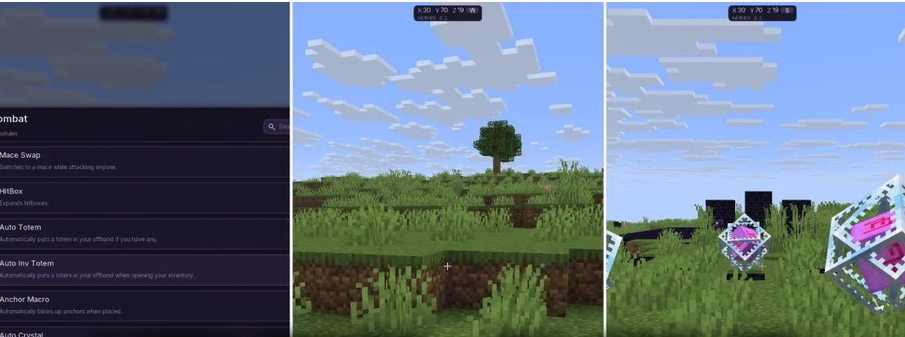
Kryzel Client Mod (1.21.11) – Dominate Intense Crystal PvP Server Battles Kryzel Client Mod equips you with a modular utility menu focused on crystal combat and server survival. It features thirty-four modules sorted into six neat categories on a dark panel. You can trigger helpful tools for fast battles, screen visuals, and economy servers with a single click. The client displays active module counters and keeps track of your game state at all times.
Features:
- Organized Category Menu: Displays thirty-four modules across six categories with live counters and an instant search bar.
- Combat Suite: Automates fast crystal placement and detonation, offhand totem switching, respawn anchor explosions, mace swaps, and hitbox adjustments.
- Donut Economy Tools: Delivers eight custom modules made specifically for player-driven economy and Donut SMP style gameplay.
- Provides seven visual render options to change how the game looks and highlight what matters on your screen.
- Offers three one-press macro tools to handle repetitive actions instantly.
- Each module card includes a fast toggle switch and a settings gear to adjust individual options.
- Lets you rearrange your on-screen interface freely with a dedicated HUD layout editor.
- Shows your current player state and total active module counts on the bottom corner panel.
Best Used For:
- Close-quarters crystal PvP encounters.
- Playing on Donut and other economy servers.
- Keeping a totem in your offhand automatically during combat.
- Arranging a clean HUD layout that matches your personal playstyle.
- Surviving long sessions on tough anarchy servers.
How to Use:
- Press Right Shift to open the main client menu.
- Browse through the sidebar categories or type a name into the search bar at the top.
- Click the toggle switch on any module card to turn it on or off.
- Click the gear icon next to a module to tweak its specific settings.
- Click the Edit HUD layout button at the bottom-left to reposition your on-screen HUD elements.